Tasky: State for my agents
While working at Cursor, I frequently juggled (and lost track of) many cloud agents for my coding tasks throughout the day. Often each agent would culminate in a PR, but not always. Sometimes I would have several agents drive a PR to completion, and sometimes I would produce multiple PRs from the same agent. It was common at the time, less so now, to experiment with products that would organize agents on a Kanban board, so that you could see more easily which agents were running, needed attention, and so on. But because the underlying task to agent relationship was not 1:1, I found these visualizations unhelpful.
Initial Kanban Board
To solve this for myself, I vibe-coded up a little Kanban application, which I called Tasky. This app was not that different from Linear (much less polished and lacking many features of course) but the best thing about it was that I could easily keep vibe-coding new features into it whenever I needed to. The app uses Convex for all of its state-storing needs, and started out with a pretty straightforward model based around hierarchical tags and tasks for organizing both my work and personal tasks.
The key early feature for me was that I could link PRs and Cursor Cloud agent links to a “Task”, and then periodically sync the status of those external objects to automatically move the tasks around. I didn’t aim for full automation, I just wanted to remove the need for the obvious moves: when an agent starts it would move to “Agent Running” status, and then afterwards, back to “In progress” to require my review for next steps.
The tag hierarchy is essentially a folder system. I can have a tag for a specific project within a more generic “Work” tag, and then set up URL bookmarks to only see “Work” tagged items when I’m at work. The kanban drag-and-drop also supports by-priority grouping, which allows for simple prioritization too.
Early on in this, I also added in an MCP server with OAuth (which was somewhat new at the time still) so that my agents could move around my tasks for me.
The everything app
Over time, I decided that what I wanted from my side projects was actually fewer different websites and projects to manage and check on. All of my projects had the same shape: they stored data in Convex, they mostly deployed with Vercel, they should someday have a mobile app, and so on. I combined several older projects of mine all into Tasky over time.
A simple habit and workout tracker I originally built in Swift, and then rewrote via agents into React Native, got merged into Tasky to become the mobile app. I introduced more data models to capture this use case too: “Signals” became a way to store time series data about when I did workouts, lessons, or watered plants. “Scorecards” were also added to nicely visualize when I completed repeating goals. Each of these new data models fit nicely into the existing primitives and could re-use the tagging system and MCP server.
Several financial apps also merged in, so that more and more data that I wanted to have easy access to all merged into one repo and was available in the same couple of surfaces. I even put the journal entries that had been digitally scanned (with a new model following some eval work after this old post) into Convex with some embeddings to allow me to back them up and search over them.
What started as my little task tracker now serves as two private webpages and a mobile app that just show me the information I want, in exactly the format I want it in.
The homepage
With the rise of always-on agents, I was checking many different places to see all the information I wanted. My agentic daily summary would come in via a chat message, or an email. The daily weather forecast could be in that, but really I want to see it as a graph over a few days. ChatGPT’s finance plugin handled the heavy-lifting of ingesting everything, but was in yet another app.
So I added a second website view for Tasky, with pretty different requirements:
- Load instantly, no loading screen - currently it fully renders in ~250ms on a cache miss.
- No reactivity - all data is pre-computed and pre-rendered.
- Private and secure - lots of this data is sensitive!
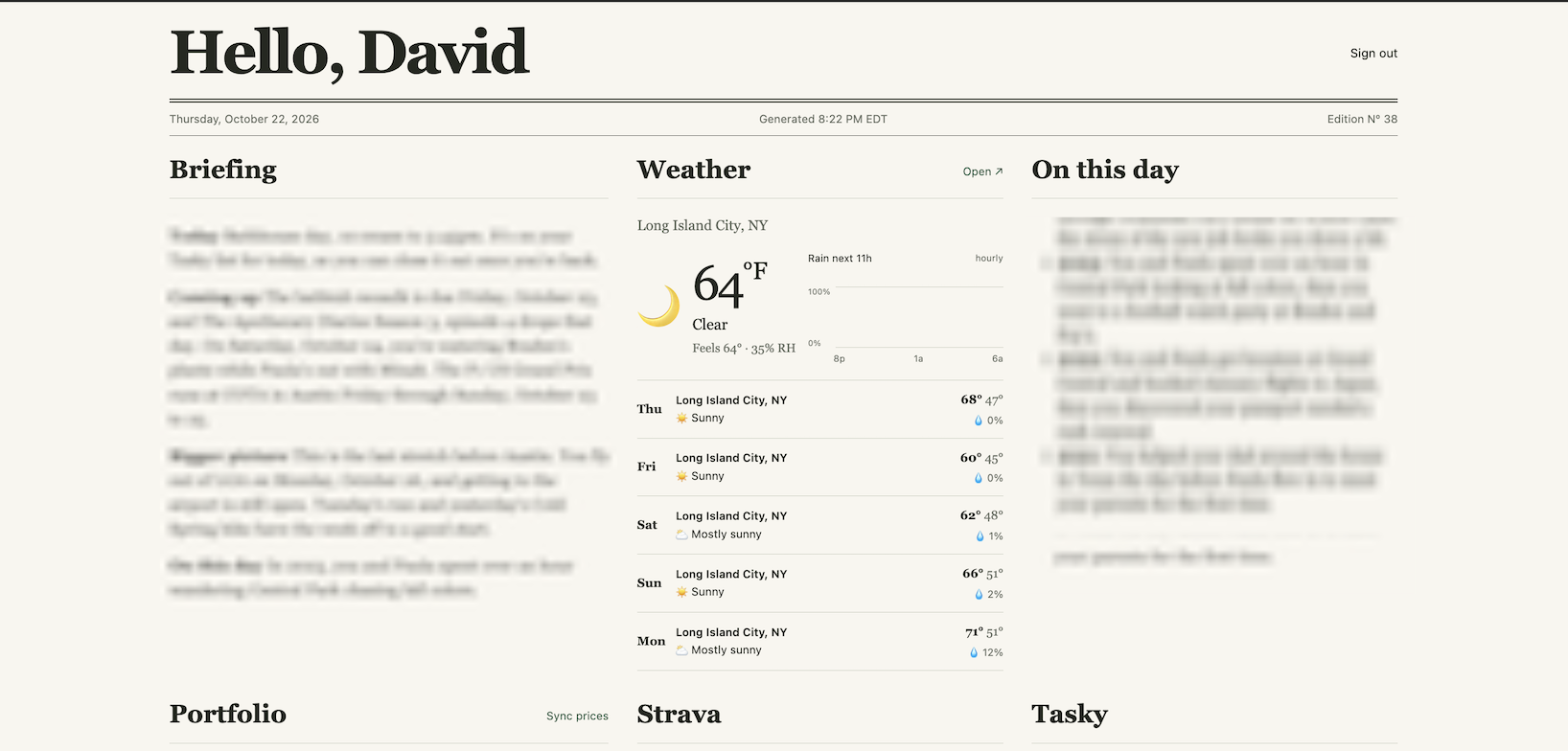
It wasn’t hard for an agent to figure out how to build this. There’s a Convex cron that triggers to create a new version with the latest data every so often. That cron pre-renders the page and sends it to a Cloudflare Worker. The worker stores it in a Durable Object for the user, which then gets read out by Cloudflare Pages when a user visits home.davidw.tech.
Widgets and stuff
The main thing I’m pleased with adding into Tasky for this is the data model. I added a concept of “Widgets” which come in various types such as the weather, a daily briefing, an “on this day” from my journal, my recurring expenses, etc. Each widget can have custom rendering logic on both the homepage and the mobile app, based around a strict Zod schema. Any agent, across any provider, can connect to Tasky via MCP and populate the data for a widget, which then powers the app across platforms. Since surfaces like the homepage aren’t reactive anyway, it’s totally fine if the agent updates it infrequently.
The result of all of this is that each morning, I have a tree of always-on agents run early each morning and put together structured data for each widget and send it to Tasky. When I wake up, I can either open my phone or go to my homepage and see all of the stuff I want in one place, to get me ready for the day. And if I don’t like the way something looks, or the way the agent populated something, fixing it is just another message away.
This section title is a reference to this blog that my friends and I greatly appreciate.